How to Transfer a RunCzech Registration (2026): Step-by-Step Guide
A detailed and clear tutorial on how to successfully navigate the Rebooking process in the Runners ID system. Find out where to click, how to generate the voucher, and how to safely pass the slot.
If you are unable to participate in a RunCzech race (such as a marathon, half marathon, or relay), you do not have to let your entry fee go to waste. The organizer allows official online re-registration through the Runners ID profile. Simply handing over a physical bib without transferring it within the official database is strictly prohibited. This practical tutorial will guide you through the entire process step by step, ensuring you complete the transfer successfully without encountering system errors.
📊 What to Prepare Before Starting the Transfer?
Before clicking the Rebooking button, make sure you meet the following conditions:
- Race Type Match: If you are transferring the registration to another race (change of location), the new event must be of the same type (half marathon for half marathon, marathon for marathon).
- Profile Currency: The receiving runner must have the exact same currency (CZK or EUR) set in their Runners ID profile as the original payment. If the currencies do not match, the system will reject the voucher.
- Payment Card: Have a card ready to pay the fixed administrative fee, which ranges from 100 CZK to 125.15 CZK. No entry fee price difference is charged.
🛠️ Step-by-Step Rebooking Procedure in Runners ID
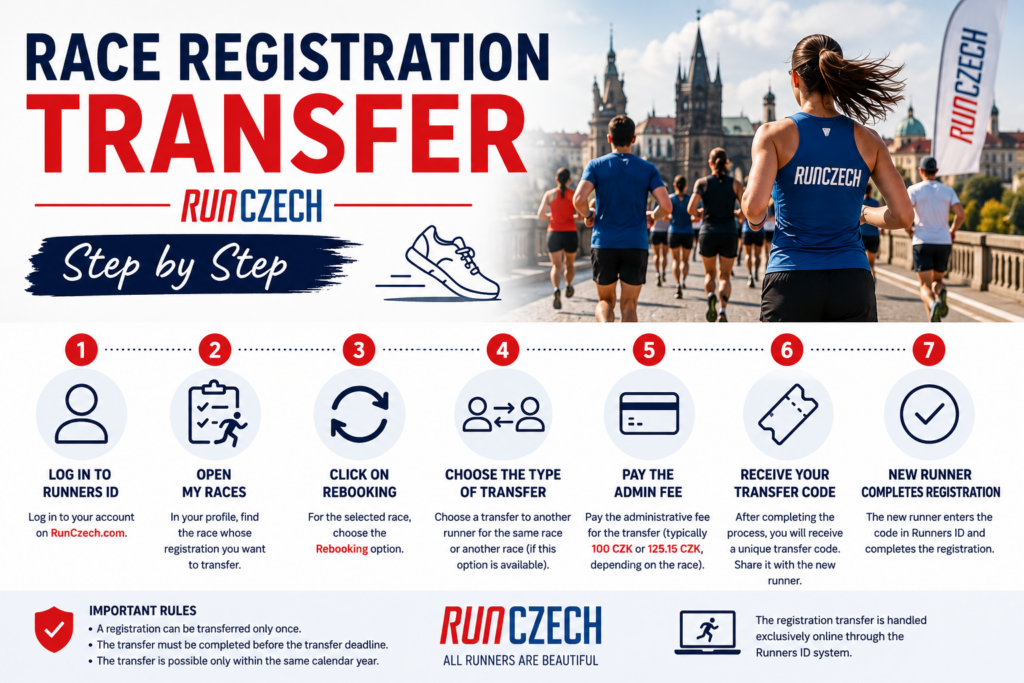
Step 1: Log in to the System
Open the official organizer website and log in to your personal Runners ID account where your active entries are stored.
Step 2: Select the Order
In the user dashboard, go to the My Orders section. Find the specific race you wish to transfer and click on its details.
Step 3: Activate Rebooking
Next to the selected race, click the rectangular REBOOKING button. The system will redirect you to the administrative panel.
Step 4: Choose the Transfer Type
Select the option according to your intent:
- To sell the slot to another individual, select transfer to another runner for the same race.
- To run yourself but at a different city venue, select transfer to another race of the same type (location change).
Step 5: Pay the Administrative Fee
Confirm your choice and proceed through the payment gateway. Pay the fixed fee (100 CZK / 125.15 CZK) online using a credit or debit card. Once approved, your original entry will be permanently canceled in Runners ID.
Step 6: Generate and Hand Over the Code
The system will immediately display and email you a unique registration code (voucher). This text code represents a 100% credit for the new registration. Share this code securely with the receiving runner.
Step 7: Finalize Entry by the New Runner
The new runner logs into their own Runners ID account, initiates a new registration for that specific event, and inserts the voucher code into the discount box in the shopping cart. The price drops to zero. The new runner then enters their personal details and emergency contacts to officially secure the bib.
👕 What Happens to Merchandise and Add-on Products?
Ordered official t-shirts and other add-ons do not transfer to the new runner automatically. Although the value of the original items is credited to the overall voucher value, the new runner must manually add these items to their cart during their new sign-up process. If they fail to do so, any remaining credit value disappears without compensation upon order completion. The online Rebooking window closes on the Tuesday prior to race day.
🛡️ Secure Financial Reimbursement via RunResell Escrow
Since RunCzech only provides the technical interface for the transfer but does not verify the payment between runners, private peer-to-peer exchanges via social media are highly risky. Scammers frequently take money in advance and disappear without sharing the code.
To ensure absolute safety, manage the voucher transfer through the specialized RunResell marketplace. Our platform utilizes a protected escrow account (Escrow):
1. The buyer securely transfers the entry fee to a neutral RunResell account.
2. The seller completes the Rebooking process in Runners ID and submits the generated voucher code to RunResell.
3. The buyer applies the code and confirms that the bib is successfully registered under their name.
4. The funds are immediately and securely released to the seller's account. The protection fee is only 6% of the ticket price.